1 / 4
Virus checked
v1.1.2.0 latest
Free Mod
Workplace Triggers
–
Rating
0 Ratings
5
Downloads
428
Views
0
Thanks
Turn any location on any map into a legitimate workplace. Open the Workplace Manager, add a trigger, give it a name and a wage, place it anywhere on the map — then walk in and clock in. Perfect for roleplayers who want their farmer to have a side job, or anyone looking to supplement farm income with off-farm work.
Features:
- Placeable trigger zones — invisible zones you can drop anywhere, indoors or outdoors
- Three pay schedules per trigger: Hourly, Flat Rate per shift, or Daily rate
- Shift tracking HUD — live workplace name, time elapsed, and current earnings; drag and resize it anywhere on screen
- Workplace Manager (F4) — view, edit, and delete all your triggers from one screen
- Shift history log — last 50 completed shifts saved with name, duration, payout, and in-game day
- Persistent saves — all triggers, names, wages, and schedules survive reloads; each savegame has its own set
- Multiplayer — each player tracks their own shifts; earnings go to the shared farm account
- Optional FS25_NPCFavor integration — completing shifts builds NPC relationships
- Optional FS25_WorkerCosts integration — off-farm income tracked alongside AI worker wages
How to use:
1. Press F4 to open the Workplace Manager and click Add
2. Name the workplace, set a wage, choose a pay schedule, then confirm
3. Place the trigger at any location on the map
4. Walk into the zone and press E to start your shift
5. Press E again to end your shift and collect your wages
Controls:
- E: Start / end shift (when inside a trigger zone)
- F4: Open / close Workplace Manager (rebindable)
- Left Shift: Toggle HUD edit mode (drag and resize the panel)
Settings:
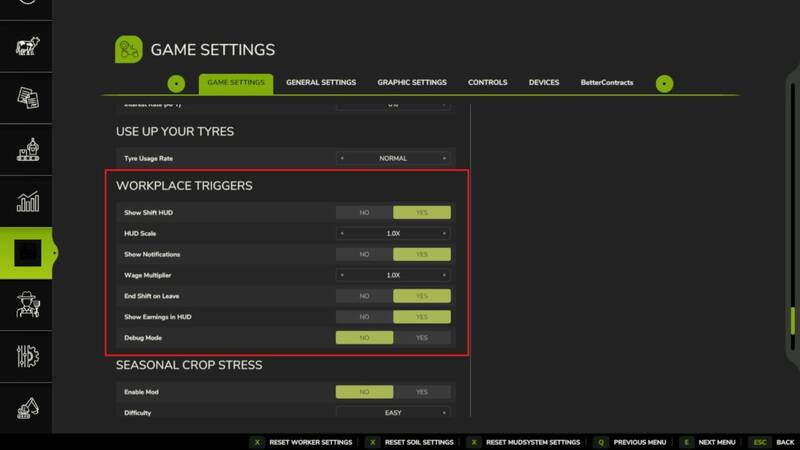
Found under ESC > Settings > General Settings > Workplace Triggers — including options for Show Shift HUD, HUD Scale, Show Notifications, Wage Multiplier, End Shift on Leave, Show Earnings in HUD, and Debug Mode.
Languages: EN / DE / FR / IT / NL / PL | Multiplayer: Yes
Features:
- Placeable trigger zones — invisible zones you can drop anywhere, indoors or outdoors
- Three pay schedules per trigger: Hourly, Flat Rate per shift, or Daily rate
- Shift tracking HUD — live workplace name, time elapsed, and current earnings; drag and resize it anywhere on screen
- Workplace Manager (F4) — view, edit, and delete all your triggers from one screen
- Shift history log — last 50 completed shifts saved with name, duration, payout, and in-game day
- Persistent saves — all triggers, names, wages, and schedules survive reloads; each savegame has its own set
- Multiplayer — each player tracks their own shifts; earnings go to the shared farm account
- Optional FS25_NPCFavor integration — completing shifts builds NPC relationships
- Optional FS25_WorkerCosts integration — off-farm income tracked alongside AI worker wages
How to use:
1. Press F4 to open the Workplace Manager and click Add
2. Name the workplace, set a wage, choose a pay schedule, then confirm
3. Place the trigger at any location on the map
4. Walk into the zone and press E to start your shift
5. Press E again to end your shift and collect your wages
Controls:
- E: Start / end shift (when inside a trigger zone)
- F4: Open / close Workplace Manager (rebindable)
- Left Shift: Toggle HUD edit mode (drag and resize the panel)
Settings:
Found under ESC > Settings > General Settings > Workplace Triggers — including options for Show Shift HUD, HUD Scale, Show Notifications, Wage Multiplier, End Shift on Leave, Show Earnings in HUD, and Debug Mode.
Languages: EN / DE / FR / IT / NL / PL | Multiplayer: Yes
Comments
You must be logged in to comment.
No comments yet.